Scaffold the category
Branch checkpoint → site + Figma context → bounded generation → migration + forms
Preview screenshot + Builder log
Running a marketplace with a small team meant repeating category setup, checking new work, and keeping track of operational problems. I built four internal agents to prepare that work and give us evidence to review before taking action.
Co-Founder & Chief Product Officer
Agent design and implementation
Two-sided wedding marketplace
Developer workflows, platform monitoring, and revenue operations
Coordinated across engineering, design, and ops
Followed by review
Screenshots, QA records, and scheduled reports
npm run builder add-vendor <type> --qaBranch checkpoint → site + Figma context → bounded generation → migration + forms
Runtime + network checks → responsive overflow → accessibility audit → severity summary
Daily checks → explicit severity → email policy → admin + leadership report
Monday snapshot → vendor-specific drafts → cooldown + cap → admin review
Expanding beyond venues to DJs, hair and makeup, or officiants required more than another marketplace listing.
Adding a category meant updating the database, creating forms, preparing admin approval records, tracking the work, and checking the result. The workflow took roughly half a day across engineering, design, and operations. Much of it repeated patterns we had already established.
I started with category setup: could one command prepare a consistent scaffold and the checks needed to review it? That became the Builder and QA workflow. Later, silent platform failures and the need to prepare vendor outreach led me to build Health and Upsell. Each addressed a specific operating task rather than trying to automate the whole business.
Reduce the work of preparing changes and finding problems while keeping approval, remediation, and vendor communication with people.
I used the same rule across the four tools: define a limited task, make its output inspectable, and be clear about what it can change. Builder prepares code and database artifacts; QA gathers findings; Health reports problems; Upsell drafts messages.
The model generates boilerplate from strong structural references: the enum name, design tokens, and the shape of an existing vendor experience. Git state, migrations, screenshots, and Notion logging sit around that generation step as deterministic operations.
Live page structure and Figma context guide new scaffolds toward the established experience.
A checkpoint and automatic working-tree rollback limit the cost of a failed run. Database changes use idempotent guards.
Deterministic templates let scaffolding continue when model credentials are missing or generated JSON cannot be parsed. Fallback behavior keeps dependencies from becoming a single point of failure.
Preview captures, logs, and structured QA findings make the output inspectable before admin review.
These boundaries let me simplify category setup to one command while retaining the preview, logs, and findings needed for a review.
Health and Upsell run on pg_cron schedules with service-role credentials. Their database reads use STABLE functions; their only persistent writes are their own history records. Reports and drafts go to people who can act on them.
The database restriction applies inside each read function. The surrounding workflow keeps operational actions with admins: Health surfaces problems, and Upsell prepares messages for a human to send.
Both agents also define what email silence means. Health sends recurring summaries and repeated failure reports. Upsell stays quiet when there are no drafts, but reports a failed snapshot.
I built the Builder to reuse an existing vendor experience and the design system, then prepare the database and form changes for a new category.
The workflow can run unattended through generation, preview capture, and reporting. A person still inspects the scaffold and QA findings before approval. The model handles a constrained generation task; the surrounding steps use defined operations.
The Builder reads a sibling vendor page and Figma tokens and components. Those references guide the generated forms and service configuration toward the existing experience.
The model returns a migration, form, route entry, and typed service configuration. The CLI runs on a dedicated branch with a checkpoint before writes and working-tree rollback after a failed run. Migration guards support repeated runs; rollback of the working tree does not itself undo database changes.
A browser captures the integration preview. The tracking record includes the category, branch, migration path, result, and screenshot, giving reviewers a way to inspect what the run produced.
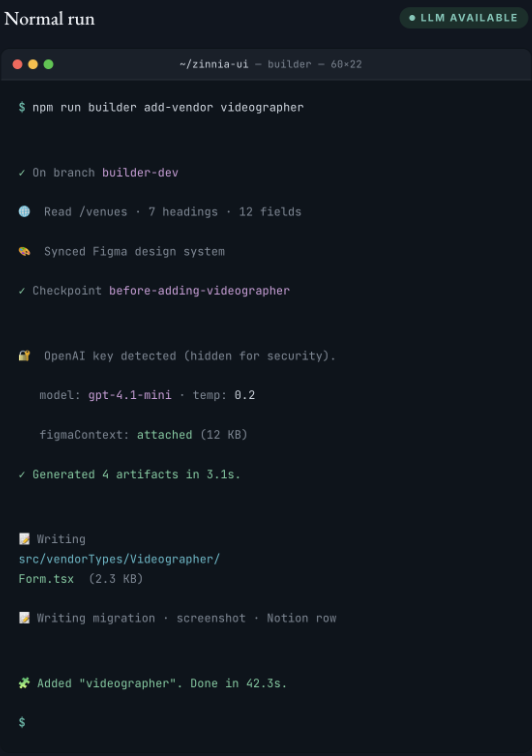
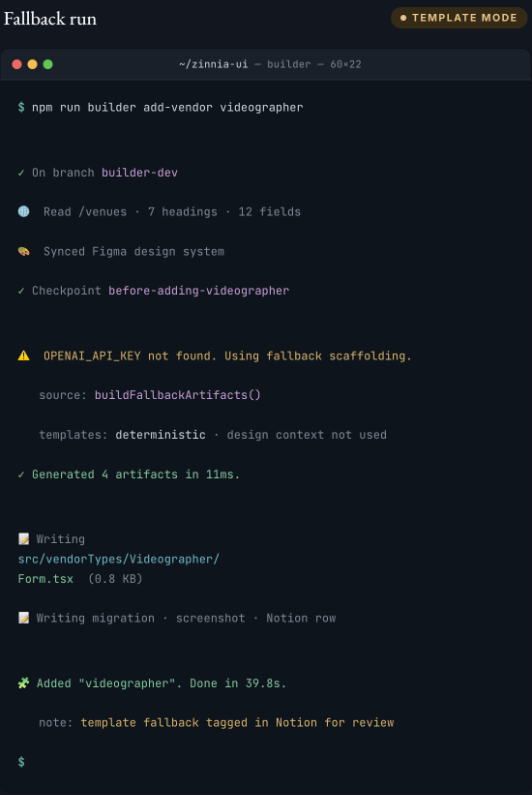
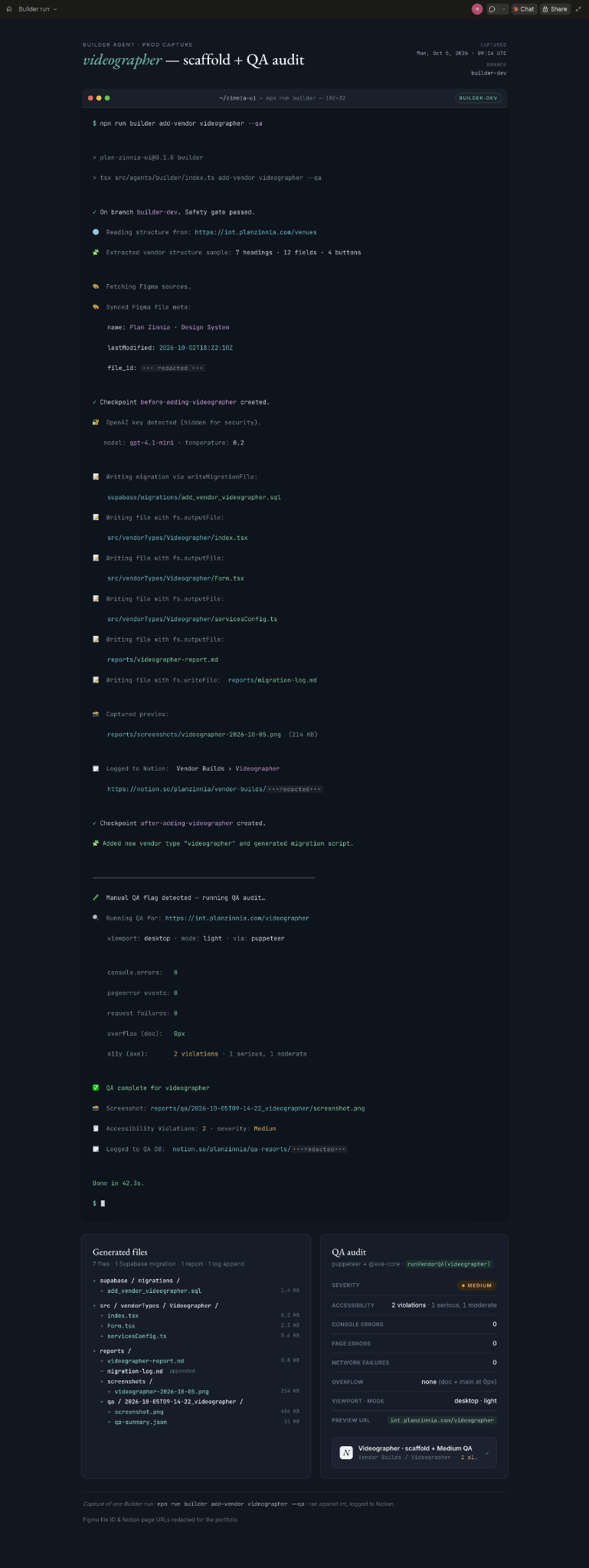
The QA Agent runs automatically with --qa after a Builder run, or independently against any vendor route. Headless Puppeteer loads the integration URL and collects the signals a reviewer needs.
Collect console errors, uncaught pageerror events, and failed network requests during page load.
Compare scrollWidth with innerWidth on the page and main content to flag horizontal overflow.
Run @axe-core/puppeteer to collect accessibility violations for review.
Combine accessibility violations, runtime errors, and network failures through a severity heuristic. Log the screenshot, counts, severity, viewport, and mode.
A thin Playwright layer in qa/tests/smoke.spec.ts runs scheduled checks against the public homepage. Builder-triggered audits and scheduled smoke tests write the same record format into a dedicated QA Notion database.
The Builder log and QA findings give ops and admin reviewers a visible trail from the scaffold to its audit results.
Several systems had quietly broken: Prerender had lapsed for three months, five edge functions had never been deployed to production, and new-message emails had stopped going out. The category-building workflow did not address this problem; we also needed a way to check what was already running.
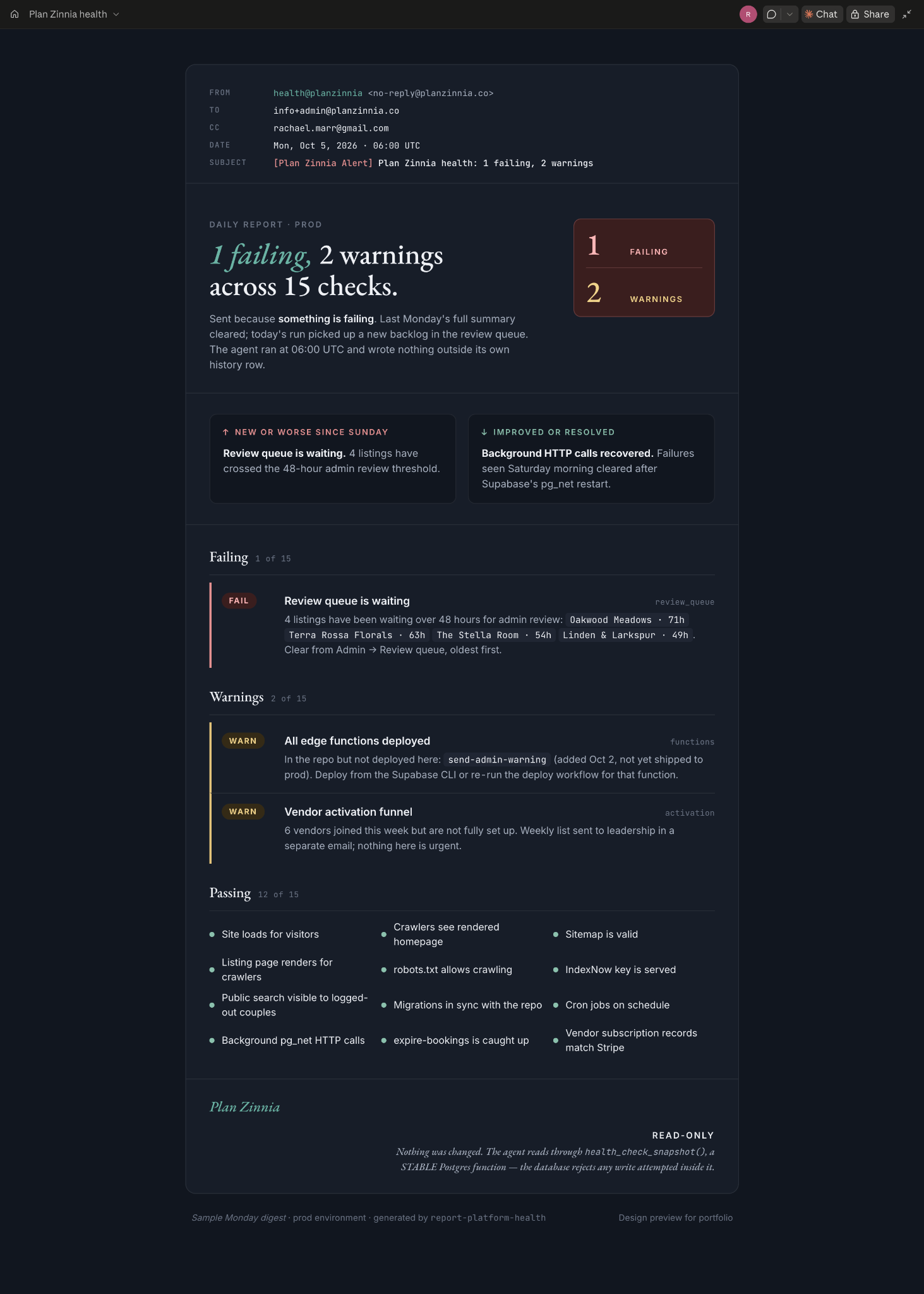
Nothing was consistently checking the running platform. I built report-platform-health, a Supabase edge function that pg_cron runs daily, to email a structured report to admins and leadership.
Compare deployed functions with the repo and migration state with production. Check Prerender render health, Stripe subscription integrity, critical bot-fetch targets, and vendor activation funnels.
Classify each check as fail, warn, info, or ok. Critical-function allowlists make severity a defined rule rather than an impression.
FAIL sends an email every run until it clears. WARN sends on change or on Mondays. Every Monday sends a full summary, even when all checks are clear, so a quiet monitor cannot disappear indefinitely without a missing expected report.
A silent monitor can look exactly like a dead one. The Monday summary gives the team a recurring signal that the checks are still running.
The agent only persists its own history record. Database reads go through a Postgres function declared STABLE, which rejects writes within that function.
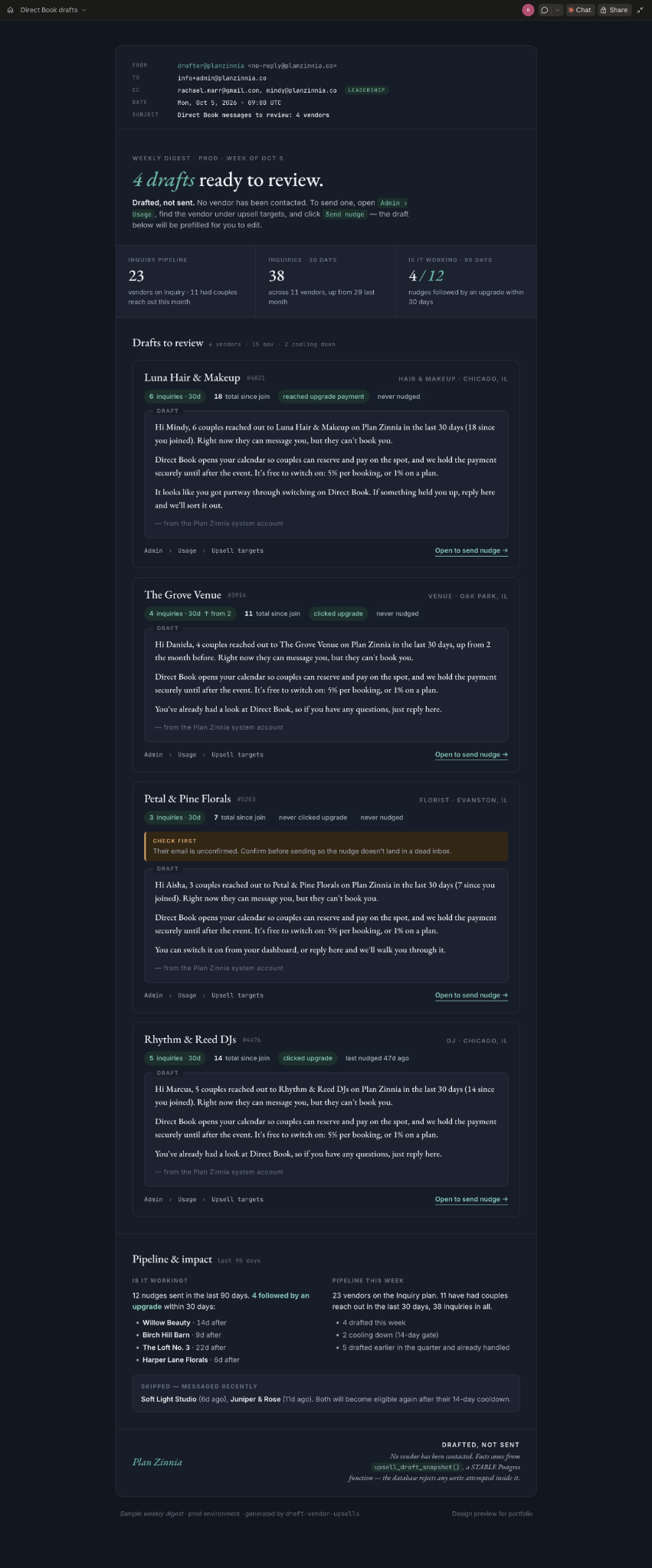
The next operational task was deciding which vendors to nudge and what to say. I built draft-vendor-upsells to do that preparation every Monday.
The agent reads each Inquiry-plan vendor’s own data through upsell_draft_snapshot(): couples who reached out in the last 30 days, upgrade-intent signals, and time since the last nudge. This snapshot function is also declared STABLE.
Use the vendor’s own inquiry counts and wording aligned with the Inquiry plan they saw at signup. A draft might mention “6 couples reached out to you in the last 30 days”—an illustrative example, not a reported outcome.
A 14-day nudge cooldown and a weekly draft cap prevent an unattended review queue from producing a flood.
Email drafts to admins, with leadership copied only in production. A person reviews, edits, and sends from Admin > Usage > Send nudge.
The send records nudge_sent. Subsequent weekly reporting can use that record to show whether nudging is working.
A week with no drafts produces no email. A failed snapshot still sends an email, so a broken job cannot pass as a quiet week.
The time comparison describes the onboarding workflow. It does not imply a measured end-to-end runtime or remove the need for review. Health and Upsell outcomes describe the operating workflow; no measured revenue uplift or reduction in incidents is claimed.